

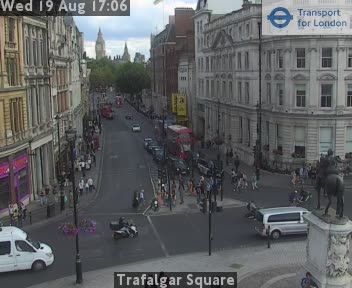
Trafalgar Square is a tourist postcard and a traffic knot. TfL publishes a square-facing JamCam toward Horse Guards Avenue, plus Charing Cross Road cameras that show how the West End approaches behave.
People open these feeds for protests, celebrations, and ordinary "is Whitehall moving" checks. The public stills are blunt: asphalt, buses, people at the curb.
Open Trafalgar Square live
Jump to the London grid with search applied. Public TfL stills, free, no account.
Watch live camerasWhat the Trafalgar Square feeds show
The Trafalgar Square camera angle is about the junction and the crowd edge, not a skyline tour. Charing Cross Road tiles add the north-south pulse toward Cambridge Circus and Leicester Square.
Event days fill the frame with barriers and people. That is useful even when vehicle counts drop, because bus diversion is often the real delay.
Matched public cameras for this page:
- Trafalgar Square (Zoom - Horse Guards Avenue) (Central)
- Charing Cross Rd/Cranbourne St (North - CXR twds Cambridge Circus) (Central)
- Charing Cross Rd / Cambridge Circus (Zoom twrds Leicester Sq) (Central)
Labels come from Transport for London JamCams. Search the grid with the same strings when a name is long.
When the corridor gets ugly
Midday tourist volume and evening West End shows both matter. A quiet Tuesday 7 a.m. frame tells you almost nothing about Saturday 8 p.m.
If you are meeting someone on the square, check 30 minutes out. Pedestrian spill into crossings shows up before car apps complain.
Weekday peaks run roughly 7-9:30 a.m. and 4:30-7 p.m. local time. Rain, low sun glare, and long winter nights all cut image contrast.
How to pull the live tiles
Open London live cameras. Try search text Trafalgar Square first. Refresh is about every 30 seconds. The snapshot behind this grid lists 882 cameras for London.
Deep link form: /london/?q=Trafalgar%20Square. Map view helps when you think in exits instead of names. Hide tiles that stay black.
Field habits
Open Trafalgar Square and one Charing Cross Road camera together. If both are packed, walk the last stretch.
Search "Trafalgar Square" exactly; a plain "Trafalgar" query can pull Greenwich-side roads you do not want.
Keep Trafalgar Square (Zoom - Horse Guards Avenue) and Charing Cross Rd/Cranbourne St (North - CXR twds Cambridge Circus) side by side when this route decides your day. If only the downstream tile is packed, the problem may still be local.
How to read a still without kidding yourself
Look at gap length between cars first. Tight gaps and brake lights mean the next minute is slow even if one lane flickers. Empty asphalt with a single truck can be a temporary block, not a corridor failure. That is why a second camera exists.
On London, images update about every 30 seconds from Transport for London JamCams. If a frame looks frozen, wait one cycle before you declare the feed dead. Night and weather cut contrast; movement still usually shows on major roads.
Place pages go stale if you only open them on perfect weather days. Open Trafalgar Square once on a normal Tuesday so you know what "fine" looks like in that angle.
Hard limits
These are traffic cameras. They are not a concert stream and not a security replay. Refresh is measured in seconds, detail is limited at night.
These feeds exist for traffic operations. They are public roadside stills, not private security video and not a cinema stream. Do not try to read plates or faces. Use them to time a departure.
Source and coverage
Source on file: Transport for London JamCams. Camera count in the current London snapshot: 882. Some units drop offline without a public ticket. The grid lets you hide them so they stop cluttering the page.
Search by junction name, road number (a4, a406), or neighborhood. Area filters appear when the snapshot carries area tags. Favorites stay in local browser storage on this device only.
A note on names and search
Agency labels are written for operators, not for marketing. If "Trafalgar Square" returns nothing, shorten to the road shield or a cross street from the list above. The London search box matches substrings in those official names.
When two labels look alike, open both for one refresh cycle. The wrong camera wastes less time than a wrong ramp.
Mobile use without losing the plot
Turn the phone sideways on wide freeway frames. Save the London grid to your home screen if this is a daily check. Cellular data on a bridge approach is a bad moment to discover a huge uncached grid; open your favorites first.
Why this page exists next to the raw grid
The raw London grid is complete and a little hostile if you do not already know the agency labels. A focused page for Trafalgar Square is a short path: primary search string, a handful of matched cameras, and the timing notes that match how people actually drive here.
If you already live on the corridor, skip the prose and keep the deep link. If you do not, read the matched list once so the abbreviations stop looking like noise.
Share the deep link with anyone meeting you. Arguments about "traffic" go faster when both people see the same still.
Nearby guides
Full grid: London cameras. City index: all cities.
TfL already publishes the images. This page is a shorter path to the ones that match "trafalgar square live camera".